Prebid Plugin Renderer
Overview
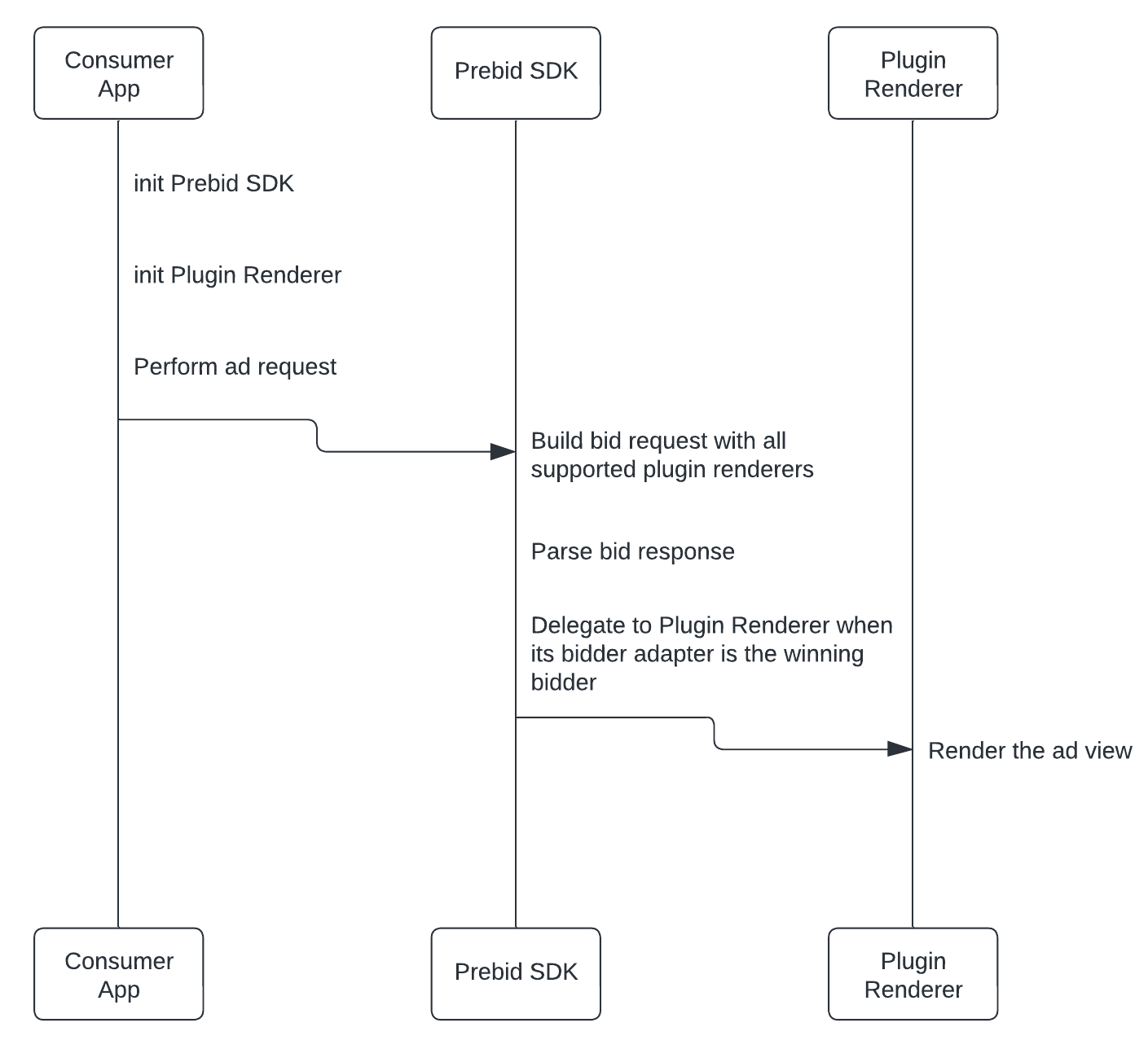
Plugin Renderer is a feature that enables the ability to delegate the ad rendering to a component of yours. Such feature turn possible, for instance, the rendering of non-standard ad responses that Prebid Mobile SDK can not render by itself. This integration require from you, in first place, to have a Bidder Adapter implemented in order to handle bid requests from the Prebid Mobile SDK that include your Plugin Renderer.
Ad view transposing
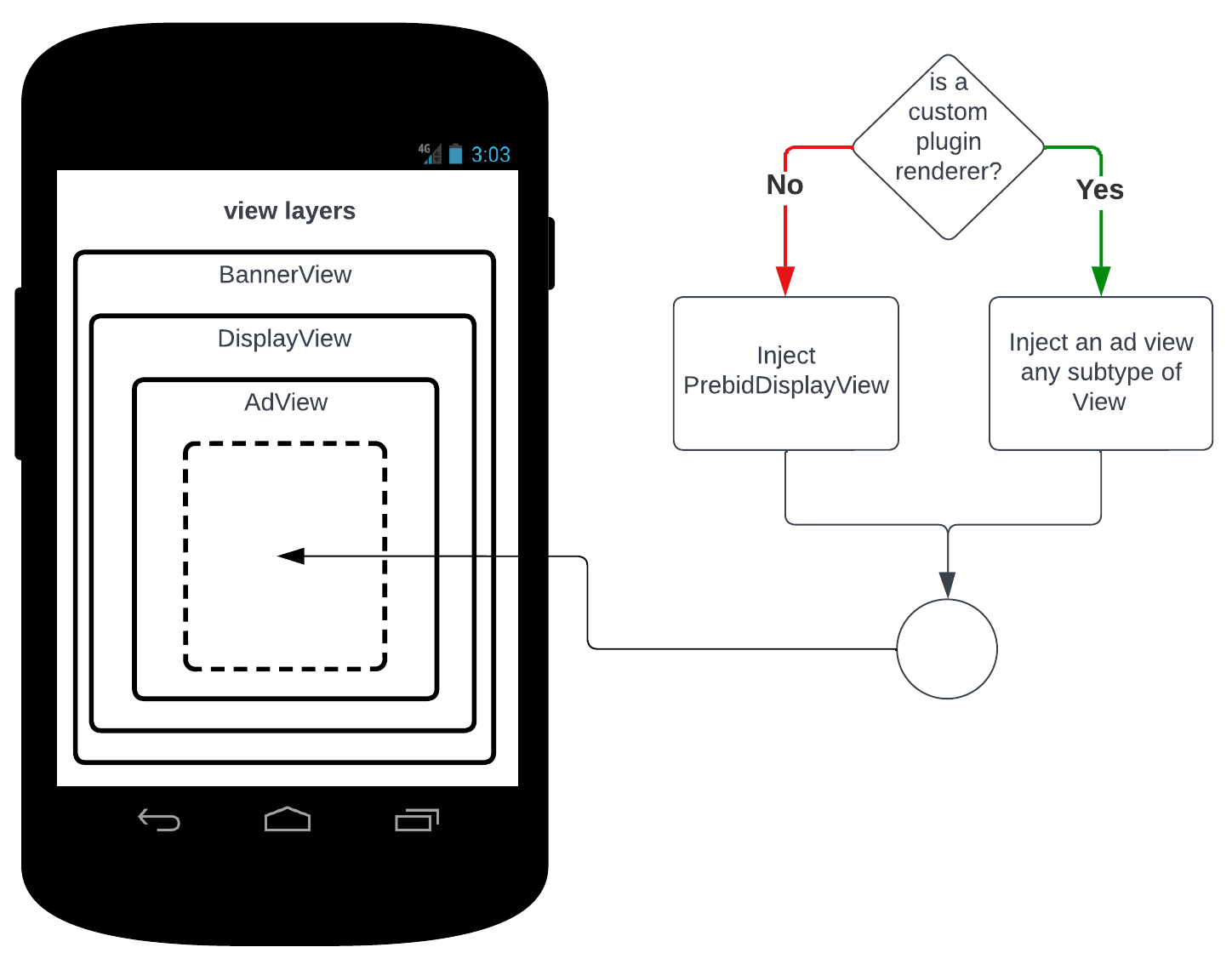
Everytime that a bid response is received and it reaches the rendering stage, Prebid SDK will delegate the ad view rendering to an existing Plugin Renderer, such as a custom one if this is elected or the default one in any other case.
Take the example on the image below where a BannerView will have its ad view transposed accordingly to the Plugin Renderer status. The inner ad view is handled totally under the hood from the app owner point of view, what makes unnecessary any change on the BannerView loading or initialization.
In case of Interstitial ad this is just inflated in the foreground regardless the view hierarchy.
Setup
- Provide your Prebid Bidder Adapter
- Create your implementation from the interface
PrebidMobilePluginRenderer - Initialise your Plugin Renderer before starting to request ads
- Take advantage of the Plugin Renderer fields
Please notice that all implementation on mobile related to the Plugin Renderer should be provided externally, not in the PBM SDK itself. For instance, an app owner or third party SDK would implement it and initialise it on their own context.
Create your implementation from the interface PrebidMobilePluginRenderer
class SampleCustomRenderer : PrebidMobilePluginRenderer {

    override fun getName(): String = "SamplePluginRenderer"

    override fun getVersion(): String = "1.0.0"

    override fun getData(): JSONObject? = null

    override fun registerEventListener(pluginEventListener: PluginEventListener?, listenerKey: String?) { }

    override fun unregisterEventListener(listenerKey: String) { }

    override fun createBannerAdView(
        context: Context,
        displayViewListener: DisplayViewListener,
        displayVideoListener: DisplayVideoListener?,
        adUnitConfiguration: AdUnitConfiguration,
        bidResponse: BidResponse
    ): View {
        TODO("Handle bid response as you want and return your ad banner view")
    }

    override fun createInterstitialController(
        context: Context,
        interstitialControllerListener: InterstitialControllerListener,
        adUnitConfiguration: AdUnitConfiguration,
        bidResponse: BidResponse
    ): PrebidMobileInterstitialControllerInterface {
        TODO("Handle bid response as you want and display your interstitial ad")
    }

    override fun isSupportRenderingFor(adUnitConfiguration: AdUnitConfiguration): Boolean {
        return when {
            adUnitConfiguration.isAdType(AdFormat.BANNER) -> true
            adUnitConfiguration.isAdType(AdFormat.INTERSTITIAL) -> true
            else -> false
        }
    }
}
Initialise your Plugin Renderer before starting to request ads
class PpmBannerPluginRendererFragment : AdFragment(), BannerViewListener {

    override fun onCreate(savedInstanceState: Bundle?) {
        super.onCreate(savedInstanceState)

        // Init your Plugin Renderer
        PrebidMobile.registerPluginRenderer(SampleCustomRenderer())

        initAdViews()
        requestAd()
    }
}
Take advantage of the Plugin Renderer fields
The fields name, version and data from your Plugin Renderer are added to the bid request by the Prebid Mobile SDK and can be read by your Prebid Bidder Adapter in order to better handle ad requests from a Plugin Renderer taking into account its name, version and the additional values stored on the data field.
The field data can be used as below or with a more complex data structure:
    override fun getData(): JSONObject {
        val data = JSONObject()
        data.put("key", "extra_value")
        return data
    }
Win Notice
Prebid SDK sends the win notice for banner, interstitial and rewarded ads that your Plugin Renderer creates, so your renderer does not need to send it. The win notice is the bid’s nurl, the Prebid Cache URLs built from the hb_cache_host, hb_cache_path, hb_cache_id and hb_uuid targeting keys, and ext.prebid.events.win. Prebid SDK sends it once: for a banner, before it calls createBannerAdView, and for an interstitial or rewarded ad, right after createInterstitialController returns your controller.
If your Plugin Renderer, or the ad SDK it wraps, already sends the win notice itself, override sendsWinNotice and return true. Prebid SDK then skips its own win notice for ads that your renderer creates, so the notice is not sent twice.
class SampleCustomRenderer : PrebidMobilePluginRenderer {

    // The renderer sends the win notice itself.
    override fun sendsWinNotice(): Boolean = true

    // ...
}
If your renderer returns null and Prebid SDK falls back to its own renderer, Prebid SDK sends the win notice for that ad, whatever sendsWinNotice returns.
Limitations
Supported Ad Formats
Currently the interface PrebidMobilePluginRenderer provide the ability to render BANNER and INTERSTITIAL only. The compability with more ad formats can be supported in future releases.
It is important to notice that the compliant formats you set on isSupportRenderingFor implementation are taken into account to add your Plugin Renderer to the bid request or not, according to the ad unit configuration that is bid requesting.
Original API
The Plugin Renderer feature does not work with GAM Original API since the ad rendering does not happen in the Prebid SDK but externally. Despite that if you are using the regular GAM integration it will work fine.
Mediation Adapters
Starting from Prebid SDK 3.4.0, the AdMob and AppLovin MAX adapters render banner, interstitial, and rewarded bids through the Plugin Renderer that the bid names as its preferred renderer, the same way the Rendering API does. If the Plugin Renderer doesn’t return an ad view or interstitial controller, the adapter falls back to the default Prebid renderer. Earlier versions always used the default Prebid renderer in the adapters.
Ad Event Listeners
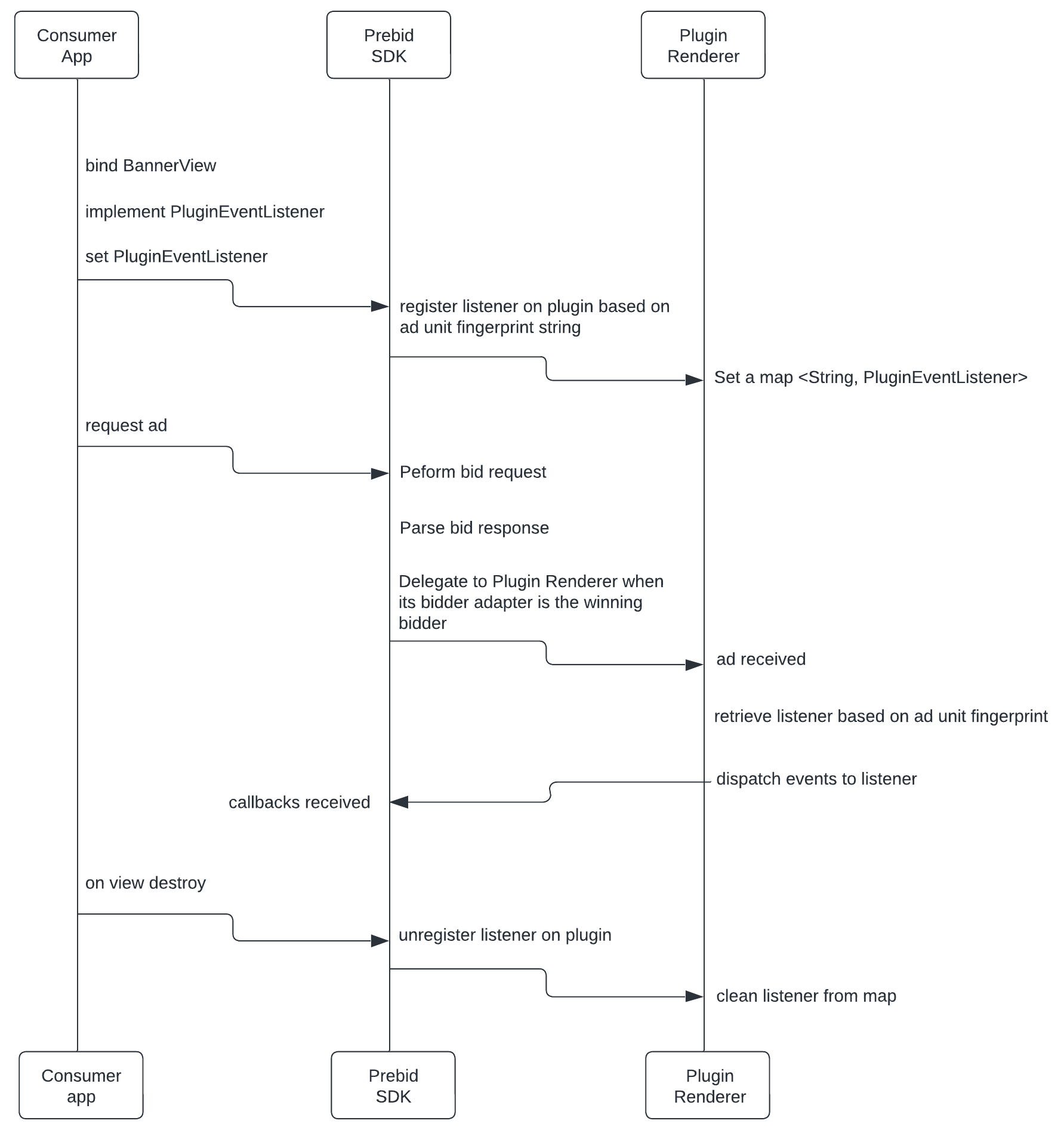
An optional dedicated generic ad event listener is offered in case of the existing event listeners are insufficient to keep your ad consumer fully aware of your ad lifecycle.
Setup
- Create your implementation from the interface
PluginEventListener - Handle your plugin event listener on your Plugin Renderer
- Implement the interface on the class you want to listen the events
- Set your listener on your
BannerViewinstance orInterstitialAdUnitinstance
Create your implementation from the interface PluginEventListener
interface SampleCustomRendererEventListener : PluginEventListener {
    // Ensure that the name is the same as your Plugin Renderer
    override fun getPluginRendererName(): String = "SamplePluginRenderer"
    fun onImpression()
}
Handle your plugin event listener on your Plugin Renderer
class SampleCustomRenderer : PrebidMobilePluginRenderer {

    // Store your listeners
    private val pluginEventListenerMap = mutableMapOf<String, SampleCustomRendererEventListener>()

    override fun getName(): String = "SamplePluginRenderer"

    override fun getVersion(): String = "1.0.0"

    override fun getData(): JSONObject? = null

    // Called whenever an ad consumer wants to subscribe to your ad lifecycle events
    override fun registerEventListener(pluginEventListener: PluginEventListener?, listenerKey: String?) {
        (pluginEventListener as? SampleCustomRendererEventListener)?.let {
            pluginEventListenerMap[listenerKey] = it
        }
    }

    // Called whenever an ad consumer wants to unsubscribe from your ad lifecycle events
    override fun unregisterEventListener(listenerKey: String) {
        pluginEventListenerMap.remove(listenerKey)
    }

    override fun createBannerAdView(
        context: Context,
        displayViewListener: DisplayViewListener,
        displayVideoListener: DisplayVideoListener?,
        adUnitConfiguration: AdUnitConfiguration,
        bidResponse: BidResponse
    ): View {
        val adView = AdManager.getAdView(bidResponse.winningBid?.adm, context)

        adView.viewTreeObserver.addOnGlobalLayoutListener(object : ViewTreeObserver.OnGlobalLayoutListener {
            override fun onGlobalLayout() {
                // Retrieve the ad listener and track your ad event once convenient
                pluginEventListenerMap[adUnitConfiguration.fingerprint]?.onImpression()
                adView.viewTreeObserver.removeOnGlobalLayoutListener(this)
            }
        })

        return adView
    }

    override fun createInterstitialController(
        context: Context,
        interstitialControllerListener: InterstitialControllerListener,
        adUnitConfiguration: AdUnitConfiguration,
        bidResponse: BidResponse
    ): PrebidMobileInterstitialControllerInterface { }

    override fun isSupportRenderingFor(adUnitConfiguration: AdUnitConfiguration): Boolean {
        return when {
            adUnitConfiguration.isAdType(AdFormat.BANNER) -> true
            else -> false
        }
    }
}
Implement the interface on the class you want to listen the events
// Implement your plugin event listener interface
class PpmBannerPluginEventListenerFragment : AdFragment(), SampleCustomRendererEventListener {

    override fun onCreate(savedInstanceState: Bundle?) {
        super.onCreate(savedInstanceState)
        PrebidMobile.registerPluginRenderer(SampleCustomRenderer())
    }

    override fun initAd(): Any? {
        bannerView = BannerView(
            requireContext(),
            configId,
            AdSize(width, height)
        )
        binding.viewContainer.addView(bannerView)

        // Set the plugin event listener
        bannerView?.setPluginEventListener(this)

        return bannerView
    }

    // Override and listen events from your plugin event listener
    override fun onImpression() {
        LogUtil.debug(TAG, "onImpression")
    }
}
Resources
In addition to this documentation you have samples on hand which can be get from the Prebid Mobile SDK repository:
- PpmBannerPluginRendererFragment
- PpmBannerPluginEventListenerFragment
- PpmInterstitialPluginRendererFragment
- PpmInterstitialPluginEventListenerFragment
Plugin Renderer providers
The following list contains documentation for known supported Plugin Renderer providers.
| Company | Documentation |
|---|---|
| Teads | Teads Plugin Renderer Docs |
| InMobi | InMobi Plugin Renderer Docs |